While we weren’t expecting any major PC gaming announcements from Nvidia at this year’s CES event, it was still somewhat disappointing that the main things we got were an update to DLSS and a new version of G-Sync Pulsar. But that’s okay, because as it so happens, they’re both actually pretty good. Well, in the case of the new DLSS 4.5, it’s mostly good.
With version 4.5, Nvidia has introduced three new elements to its AI-powered suite of rendering technologies: a second generation transformer neural network for DLSS Super Resolution (aka upscaling), dynamic Multi Frame Generation (MFG), and a 6x mode. However, only the first one is available to use right now, as the new frame gen stuff won’t make an appearance until spring.
How to use DLSS 4.5 in games
In order to force games to use the new upscaler, you’ll need to use the 591.74 GeForce Game Ready drivers, plus the latest beta version of the Nvidia app (though a full release may be released by the time you’re reading this). To get that, click on the Settings option in the Nvidia app, then select About, and finally check the option to opt into betas. You’ll probably need to restart the app after that so that the program can check for an update.
It’s important to note that DLSS 4.5 Super Resolution doesn’t automatically work, as things currently stand, and you will need to enable it on a per-game basis. For example, if you want to use DLSS 4.5 instead of DLSS 4 in Black Myth: Wukong, head to the Graphics menu in the Nvidia app, select the game, and then scroll down to Driver Settings.
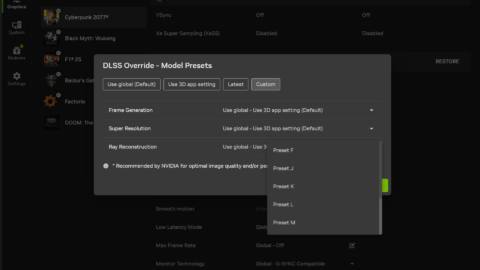
You should see an option labelled DLSS Override – Model Presets. By default, this will say ‘Use the 3D application setting’, but when you click on that, you’ll be shown the following window.
If you don’t want to mess about with DLSS neural network models/presets, just click on Latest, followed by the Apply button. The next time you dive into Wukong, it will be using the new transformer model for upscaling. Do note that it won’t affect frame generation nor will it change how DLSS Ray Reconstruction works.
The latter is especially important to note because when you enable that in a game, it automatically uses its own version of DLSS Super Resolution, and for the time being, that still uses an older neural network. I’ll say more about this later on.
DLSS Override also lets you select a specific model or preset, and Nvidia added two new ones in the new update. Model M is specifically optimised for DLSS Super Resolution Performance mode, while Model L is optimised for Ultra Performance mode when using 4K resolution. I’ve emphasised the point about 4K because while you can use it with 1440p or even 1080p, it doesn’t look anywhere near as good as when enabled at 4K.
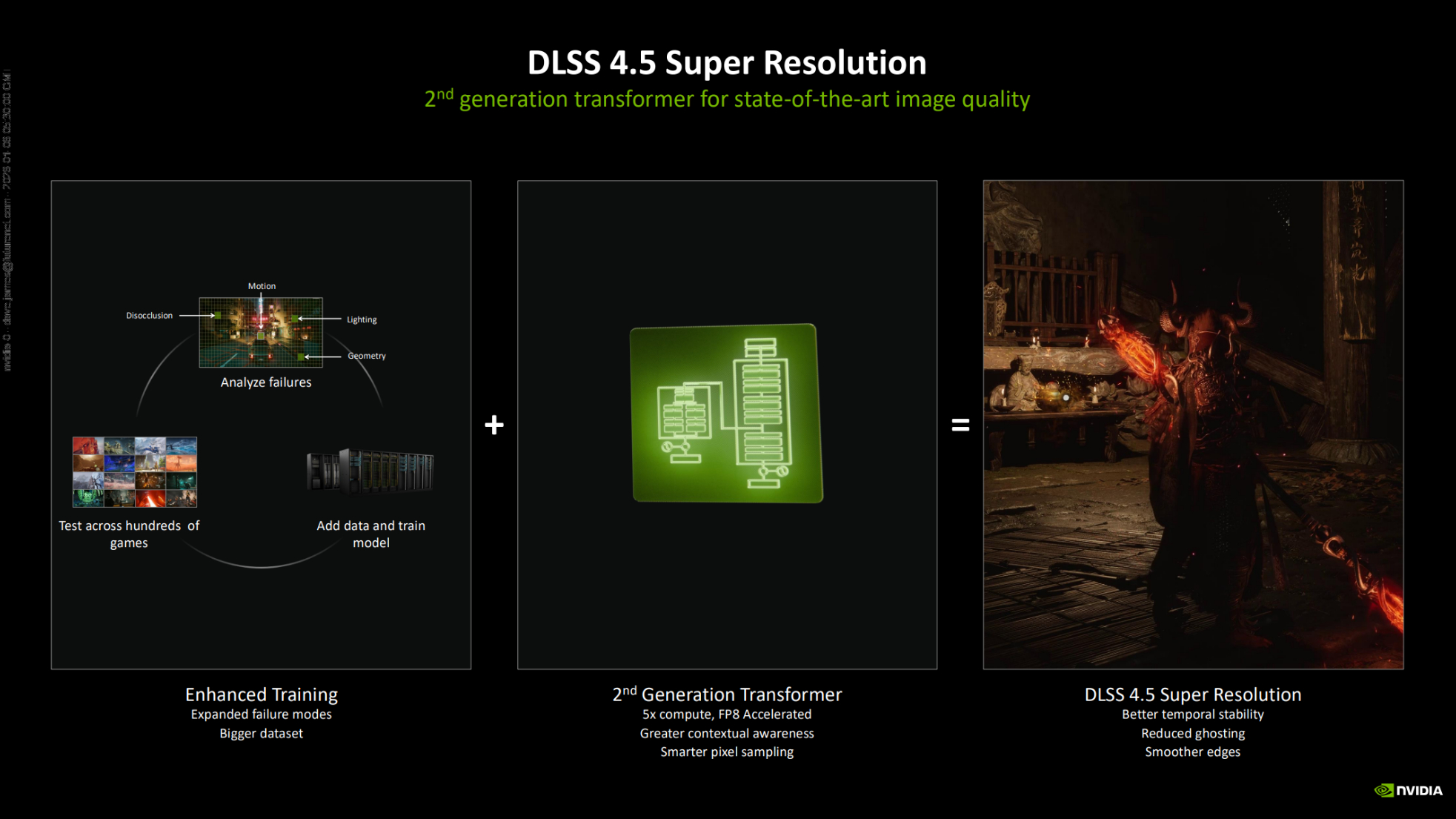
Think of these models/presets as being a specific recipe for cooking up an upscaled frame. One model might produce a sharper image compared to the others, but it might struggle more with fast-moving objects. Model M is actually the default choice for DLSS 4.5 (i.e. when you just select Latest in the override option), so for my testing, I’ve focused mostly on comparing that to the standard implementation of DLSS in a selection of games, which is DLSS 4, of course.
DLSS presets control how the AI algorithm amends the upscaled frame, with each other tuned to suit a particular DLSS mode. Preset K is the default for DLAA, Quality, and Balanced. Preset M is the new default for Performance, with Preset L now being used for Ultra Performance in DLSS 4.5.
For testing, I’ve mostly used a GeForce RTX 5090, but I’ve done some runs on a GeForce RTX 3060 Ti. The new transformer model is more complex than the first iteration, and far more so than the convolutional neural network in DLSS 2 and 3. That means there will be a performance hit in using DLSS 4.5, and the size of the impact will depend not only on what tier of GPU you’re using, but how old it is, too.
The Tensor cores in RTX 20 and 30-series GPUs don’t have native support for FP8 data formats (8-bit floating points), whereas RTX 40 and 50-series chips do. That means an RTX 3070 graphics card will see a larger performance hit than an RTX 4070 will when using DLSS 4.5.
The full specs for the test rig are: AMD Ryzen 9 9900X, MSI MEG X870E Godlike X Edition, Thermal Grizzly Der8enchtable, 32 GB Lexar Thor OC DDR5-6000 CL32, Asus ROG Ryujin III 360 ARGB Extreme, Thermaltake Toughpower PF3 1050 W, and Windows 11 25H2.
Make sure to expand each video below and set the resolution to its highest value to see the full comparison of DLSS 4 and DLSS 4.5 in each game.
Cyberpunk 2077
Starting off with the game that’s almost always first in line to support Nvidia’s latest AI tech, I used Cyberpunk 2077‘s built-in benchmark to have a consistent rendering sequence for comparing the upscaler models. Graphics settings were maxed out, including the use of path tracing (even for the old 3060 Ti!), with DLSS Ray Reconstruction disabled.
For the above video, 4K Performance mode was used, with the native DLSS 4 implementation on the left, and DLSS 4.5 using Model M on the right. If you watch the frame rates carefully, you’ll notice that the extra workload of the new transformer isn’t that much of a struggle for an RTX 5090, so the obvious question to ask is whether DLSS 4.5 is worth using or not.
The visual differences are very slight, but on the whole, DLSS 4.5 produces a more stable image, with less ‘pixel crawling’ on long thin objects (e.g. barbed wire on a fence), and it does a better job of retaining the colours of pixels, especially those which brightly contrast neighbouring pixels.
Performance mode upscaling at 4K means the frame is being rendered at 1080p (i.e. the vertical and horizontal resolutions are halved), but you honestly wouldn’t be able to tell, unless you specifically searched for signs of the upscaling.
However, Performance mode upscaling at 1080p means the GPU is rendering an incredibly small 540p frame. That’s so few pixels that even an RTX 3060 Ti can handle path-traced CP2077, though it’s not quite hitting the golden mark of 60 fps.
The visual differences are very slight, but on the whole, DLSS 4.5 produces a more stable image, with less ‘pixel crawling’ on long thin objects, and it does a better job of retaining the colours of pixels, especially those which brightly contrast neighbouring pixels.
The above video is 4K because I wanted to over-emphasise the differences in the upscalers; it doesn’t look anywhere near as blurry as this on a native 1080p screen. Key things to watch out for in the video are the barman’s jewellery, the outline of brightly-lit characters against dark backgrounds, and objects that have lots of thin/contrasted lines.
You should be able to see that while DLSS 4.5 does a better job of preserving pixel colours and reducing shimmering on edges, it’s a little overzealous at handling fine lines (the barbed wire is less detailed until the camera is up close), as well as producing a more noticeable black ‘halo’ around bright objects against dark backgrounds.
On the other hand, DLSS 4.5 is less blurry than DLSS 4, and does a better job of preserving details of dark objects against bright backgrounds.
Interestingly, the performance hit of using DLSS 4.5 on the RTX 3060 Ti is very small, so much so that it’s not worth worrying about, though that’s partly down to the fact that the old GPU is heavily limited by the use of path tracing. On lighter graphics settings, the frame rate difference is likely to be more noticeable.
Switching to Ultra Performance mode and the Model L preset, the real strength of DLSS 4.5 becomes evident. The overall stability of the rendered frames (rendered at 720p) is much better than with DLSS 4, with shimmering and the flickering of distance edges greatly reduced.
The preservation of details and colours is superior, too, and while the overall quality of Ultra Performance mode isn’t quite good enough for my tastes to warrant using it all the time, the fact that you can go from 720p to 4K and still look this good feels very impressive.
With the RTX 3060 Ti set to run Cyberpunk 2077 at 1080p, Ultra Performance mode DLSS means it’s only rendering at 360p. That’s lower than most gaming setups of the early 1990s, which typically ran at 480p. It’s remarkable that any kind of usable image can be produced from so few pixels.
That said, I wouldn’t want to play the game like this, despite the increase in frame rate from using Ultra Performance. DLSS 4.5 produces a better overall image than DLSS 4, again with less shimmering and flickering, but it’s hardly what you’d call a treat for your eyes. The performance impact of using Model L (which is a little heavier than that of Model M) is more evident here, but losing around 10% of the frame rate isn’t worth complaining about.
Black Myth: Wukong
As with Cyberpunk 2077, I tested Black Myth: Wukong at maximum graphics settings, including path tracing. The game doesn’t support DLSS Ray Reconstruction, so there was no need to worry about that.
I chose this particular game because, by default, it produces an overly sharp final image. That can be scaled back in the game’s graphics settings, but I left the slider alone as I wanted to see just how much sharper DLSS 4.5’s output is compared to DLSS 4’s.
The answer? It’s too sharp, or at the very least, too sharp for this game on default settings. At first glance, you might think that DLSS 4.5 is retaining more detail than DLSS 4, but to my eyes, the level of sharpness is somewhat distracting. It’s not a deal-breaking issue, though, as you can counter the problem by knocking the sharpening slide in the game’s menu down a notch or two.
On the plus side, the game looks less washed out with DLSS 4.5, and in the later stages of the built-in benchmark run, you’ll notice that the leaves and needles on trees look fuller than those in the DLSS 4 footage.
It’s the same story with the RTX 3060 Ti at 1080p, though the excessive sharpening isn’t quite as bad, due to the lower frame resolution. It’s still noticeable, as is the performance hit from using the new transformer model, but where I’d want to tackle the sharpening at 4K on an RTX 5090, I’d be happy to play Black Myth: Wukong like this on an RTX 3060 Ti.
I’d be happy to play Black Myth: Wukong like this on an RTX 3060 Ti.
Running the tests again with Ultra Performance mode and Model L produces some unexpected results. Look at the trees in the background as the camera moves under the bridge, in the opening stages of the benchmark run. DLSS 4.5 makes quite a mess of them, whereas they’re fine with DLSS 4.
That’s being caused by the excessive sharpening, but whereas it’s easy to counter this in Performance mode, I never managed to fully get rid of it in Ultra Performance mode. Even though DLSS 4.5 preserves details better than DLSS 4, I’d stick with the older upscaler in this game. It’s not worth the hassle, nor the performance drop, regardless of how small it is.
However, at 1080p, the flickering and shimmering of the trees vanish, and the overall frame quality is better with DLSS 4.5 than with DLSS 4. Not that the game is actually playable like this, as the use of path tracing and full-blown Unreal Engine 5 Nanites is just too much for the little 3060 Ti. Even at 360p rendering.
Stalker 2
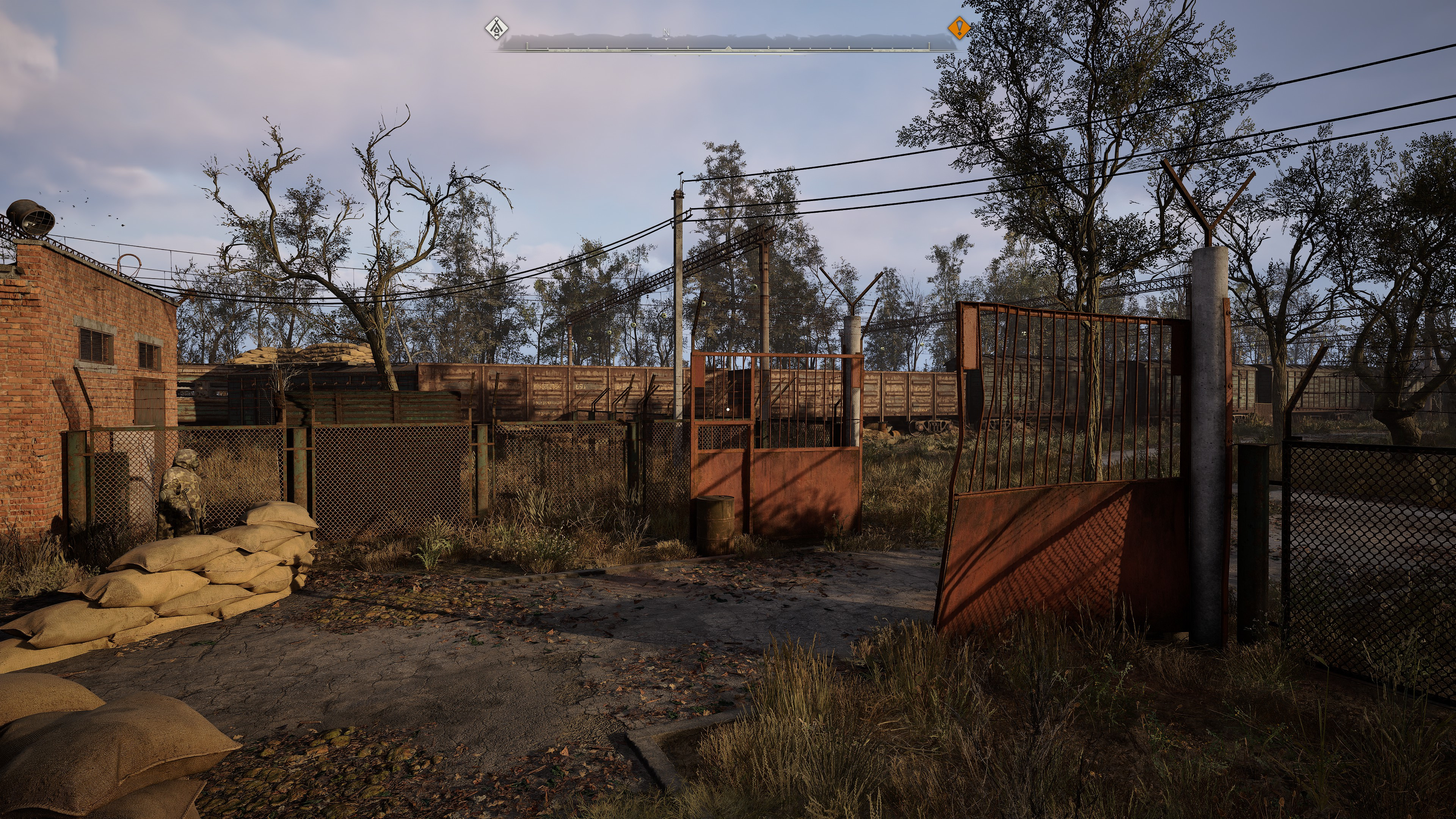
It’s perhaps unfair to test another Unreal Engine 5 game, but where Black Myth: Wukong uses every graphics trick and feature of Epic’s software package, Stalker 2 sticks with the performance-friendly version of Lumen global illumination (i.e. ‘software’ ray tracing), though it’s still a serious GPU workout at maximum quality settings.
As there’s no built-in benchmark in Stalker 2, I resorted to trying my best to have near-identical runs to make comparisons easier. It’s fair to say that I wasn’t overly successful in this aspect, but there’s still enough in the footage to judge the relative merits of DLSS 4.5 to DLSS 4.
The main things to look out for are the telephone cables, suspended between poles, and the foliage on trees (especially as the camera moves closer to them). With DLSS 4, they both lack fine detail, but with DLSS 4.5, that problem is greatly reduced. It’s not absolutely perfect, though Stalker 2’s assets can sometimes look like this even at native rendering or with DLAA.
One thing of interest is that the game is mostly CPU-limited with these settings (4K Performance mode), as indicated by the lack of difference in performance and the relatively low GPU utilisation. However, you can see that the RTX 5090 uses considerably more power with DLSS 4.5. That’s the extra Tensor core workload of the new transformer model in action.
At 1080p, you can more easily see just how much better DLSS 4.5 is at handling the telephone cables and foliage than DLSS 4 (don’t forget that the 4K video is exaggerating how blurry the original 1080p footage looks). While it’s not 100% perfect, the newer upscaler is clearly the one to use in this game, despite the marked performance hit.
I haven’t included any footage of Ultra Performance for one simple reason: It’s basically the same as with Performance mode, just with slightly worse results. Neither the RTX 3060 Ti nor the RTX 5090 run any faster with the highest level of upscaling, due to Stalker 2’s heavy CPU loads, and the reduction in graphics fidelity means that Ultra Performance isn’t really worth considering for this game.
Even though I’ve only shown you the results of DLSS 4.5 from three situations, it should be obvious now that the impact of the improvements that the new upscaler brings is heavily dependent on what game is used. For example, below is Spider-Man Remastered, and you’ll be pushed to notice any difference at all between DLSS 4.5 and DLSS 4.
The same is true with Doom: The Dark Ages, where I even enabled 4x Multi Frame Generation to highlight any potential flaws in the new upscaler and Model L. While the 2nd-gen transformer model isn’t used in Nvidia’s frame interpolator, the system does rely on two rendered frames to generate extra ones. That means any glitches in those could be potentially magnified in AI-created frames.
I know it’s hard to compare two pieces of footage, where the camera is swinging about all over the place, but pausing the video shows that both iterations of DLSS are perfectly acceptable in this game.
One important thing to note here is that DLSS Ray Reconstruction was disabled for these tests, and not because the system doesn’t use the new transformer. It’s because overriding DLSS 4.5 onto Doom: The Dark Ages causes almost all of the rendering to be cut out if DLSS RR is used at the same time.
In Cyberpunk 2077, the game just ignores the override, but not so here. So, without Ray Reconstruction, Doom: The Dark Ages has to use Nvidia’s standard denoiser, which isn’t anywhere near as good, and any speckles and bright spots you can see are because of that, not DLSS 4.5.
DLSS 4 vs DLSS 4.5—The verdict
So, what to make of DLSS 4.5? On the whole, I prefer it to DLSS 4. I’ve quickly tested it in a range of other games, and while none of them have made me think ‘Wow, this is so much better than DLSS 4!’, the overall image quality is better when taking everything into account. Some games show little to no gains, whereas others feel a lot crisper and clearer (DLSS 4.5’s fondness for sharpening coming into play in those cases).
I’ve seen commentary from some hardware reviewers that seems to suggest that DLSS 4.5 Ultra Performance is now so good that you can use it all the time with 4K gaming, but my own testing suggests otherwise. It is better than before, but Performance mode is simply superior, and I’ll be sticking with that myself.
Is the new Performance mode model good enough to switch from Quality or Balanced mode? Well, it depends. Objectively, those modes will still result in better graphics fidelity than 50% upscaling, but subjectively, the differences can feel so slight that it’s well worth using Performance mode over anything else, just to enjoy a better frame rate.
However, as DLSS’s neural networks were trained on very high resolution game footage, the output of the upscaler does get better, the greater the resolution of your monitor. At 4K, Performance mode is absolutely superb, regardless of which DLSS version you use, but at 1080p or 1440p, you’re probably better off switching to DLSS 4.5.
There is one downside to using DLSS 4.5 that I haven’t mentioned yet, and it’s the fact that the new transformer model really works the GPU’s Tensor cores hard. For example, at one point in the Ultra Performance tests in Cyberpunk 2077, the RTX 5090 was using almost 50 W more power with DLSS 4.5 than DLSS 4.
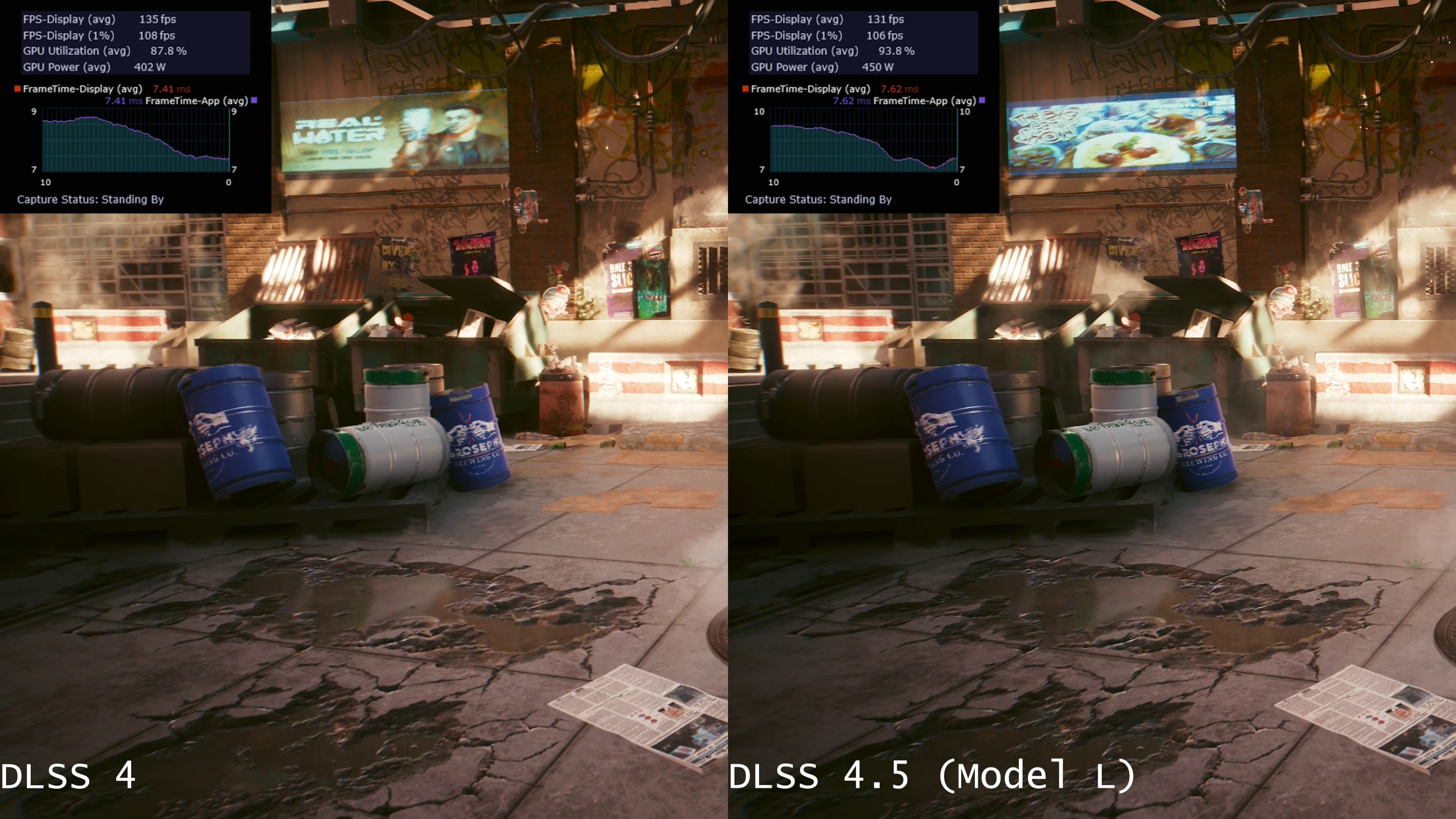
It might seem a little odd to see a GPU using more power to generate a lower frame rate, but that’s the nature of AI-powered upscaling. You get astonishing visuals from just a handful of pixels, but it doesn’t come free.
Regardless of this, the good thing about DLSS 4.5 is that it’s very easy to try it out yourself. Just update the Nvidia app, flip a few settings, and then test away to your heart’s content. Now, we just need to wait for Nvidia to update DLSS Ray Reconstruction, as well as DLSS Multi Frame Generation, and then we’ll be all set to use DLSS 4.5 everywhere.
About Author