Modern software and technologies are often so complex that it’s inevitable there will be some glitches or odd behaviours to begin with. In the case of Nvidia’s new Dynamic Multi Frame Generation, which all RTX 50-series owners can now use, there is definitely one problem that needs to be addressed.
To get a complete handle on screen tear, many PC gamers prefer to set a frame rate cap a little below the maximum refresh rate. That way the performance always remains with the window that the monitor’s variable refresh rate operates, and you get silky smooth frames on the screen.
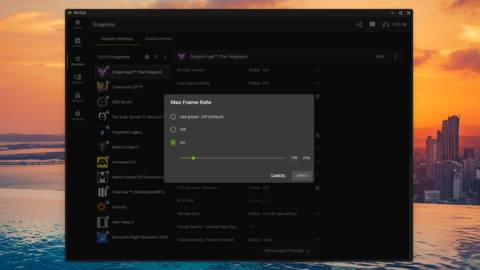
You can do this in some games directly, but it’s best to do it via Nvidia’s drivers, either in the Nvidia Control Panel or in the global settings of the Nvidia App. Using Dragon Age: The Veilguard, running at 4K with DLSS Quality and the High graphics preset, on a Ryzen 9 9950X3D and RTX 5070 combo, I found that Dynamic MFG fully behaved itself when used without any limit to the frame rate.
That said, it also lets the performance completely overshoot the refresh rate. However, when I set a cap of 138 fps in Nvidia App, Dynamic MFG decided that it didn’t want to play ball and just ran in 6x mode all the time.
While the performance you get is fine, the reported PCL figure certainly isn’t. When using DMFG without any limit to the frame rate, it comfortably sits around the 30 millisecond mark, which is nice and smooth to game with. With the 138 fps cap, though, the PCL jumps to around 50-60 milliseconds, which certainly isn’t smooth.
I’ve tried a variety of different settings in the game, but in all cases, when using a frame rate cap in Nvidia App, Dynamic MFG just locks to a fixed mode. In one example, it always stayed in 3x, which was okay to game with as the PCL remained under 40 milliseconds.
This could be a bug or just a limitation of how Nvidia’s Dynamic MFG all works. Hopefully, it’s the former, because that means there’s a chance it could be fixed at some point in the future. If it turns out to be a limitation of the system itself, then you’ll want to stick to the standard Multi Frame Generation if you always use a frame rate cap.
I’ve also seen some reports that DMFG doesn’t like certain performance overlays, such as MSI Afterburner/RTSS, but having tested that in a few games, it doesn’t appear to be an issue. In Cyberpunk 2077, Dragon Age: The Veilguard, Oblivion Remastered, and Hogwarts Legacy, RTSS displays correctly, and Dynamic MFG works as intended.
That doesn’t mean there aren’t games where RTSS and DMFG don’t play happily together, and if you’re currently experiencing such issues, flag ’em up below in the comments.
About Author